
What is Call Time?
Call Time is a feature in X-Poker cash games that lets you leave your seat for a short period, up to 20 minutes, while your chips stay on the table. It is ideal for a quick break, a phone call or grabbing dinner between orbits.
When the timer runs out and you have not returned, you will be stood up from the table, so it pays to know how much time you have left.
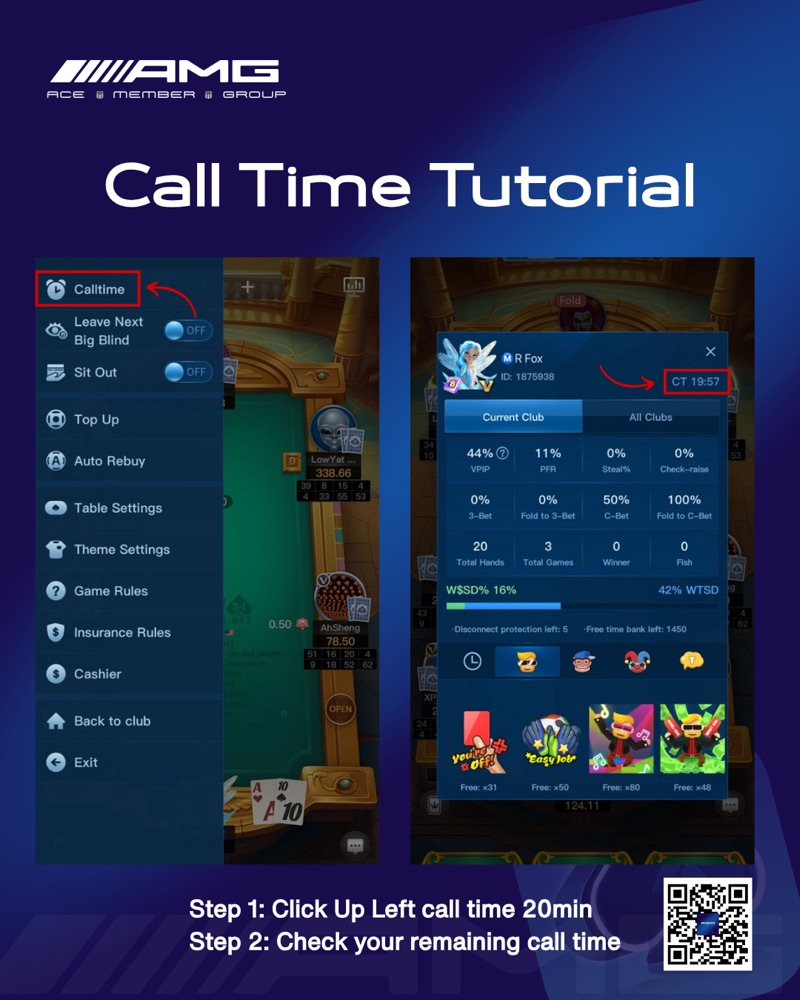
Step 1: Turn on Call Time
- At the table, tap the menu icon in the top-left corner.
- Find Calltime at the top of the list and switch the toggle on.
- Your 20-minute Call Time starts. You can leave the table and come back any time before it ends.
The same menu has Leave Next Big Blind and Sit Out, useful alternatives if you only need to skip a hand or two.
Step 2: Check your remaining Call Time
Open your player profile from the table. Your remaining Call Time appears beside your stats, marked CT, so you always know how long you can stay away.
Tips from the concierge
- Set a phone timer for 18 minutes so you are back with time to spare.
- Call Time applies to cash tables. In tournaments your stack is blinded off while you are away.
- Cannot see the Calltime toggle? Update X-Poker to the latest version from your app store.
Still stuck? Message us on Telegram at @amgclubxpoker and we will walk you through it.